

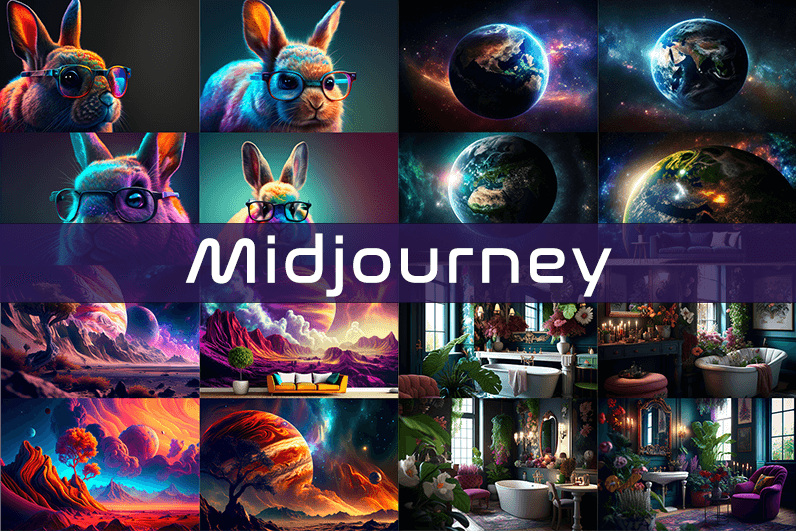
Midjourney is an AI image generation tool based on Discord, utilizing text commands to create images. You can input prompts for the type of image you’re looking for, and the system will generate the image for you. Whether it’s a dragon, an alien spaceship, a dancing puppy, or anything else, the Midjourney bot will assist you.
Key Points
- Discord-Based: Midjourney operates on Discord, so familiarity with Discord chat is necessary.
- High-Quality Images: It generates high-quality images based on text prompts.
- Artistic Styles: Capable of creating images in various artistic styles from sketches to paintings to surreal photos.
- Community Interaction: Engage with the community and participate in channels.
- Image Editing: Allows you to edit your images and create multiple variations.
- Upscaling: You can upscale your images to enlarge them.
- Customization: Fine-tune images by specifying aspect ratio, quality, and chaos levels.
- NLP Features: Excellent natural language processing features ensure accurate results.
- Version 5: The latest version, released in March 2023, is accessible to users.
- No Free Plan: Offers various paid plans according to user needs.
How We Tested the Product
I tested both simple and complex prompts, and Midjourney consistently provided accurate results. While I don’t consider myself an artist, it felt like engaging in artistic creation. You’re only limited by your imagination. It generates four images per prompt. You can select one of the four images and edit it. I tried various styles, and the results were perfect every time. Testing Midjourney felt more like fun than work.
Pros and Cons of Midjourney
Pros 👍
- Extremely easy to use; just type text prompts to generate images.
- Highly accurate results with high-quality images.
- Version 4 was great, and version 5 offers even better results.
- Provides fine-tuning features for artists.
Cons 👎
- No free trial.
- Images are public to other users, so you can’t create business designs.
- Only available on Discord.
- Limited customer support.
What is Midjourney?
Midjourney is a text-to-image generation tool powered by artificial intelligence. It uses Natural Language Processing (NLP) to interpret prompts provided by users and generates relevant images based on those prompts. Currently in version 5.2, Midjourney does not have a standalone application and operates on Discord chat. It boasts a large community where you can join channels to interact with other artists. While it can create stunning images, it is not recommended for business design purposes as all images are public.
How Does Midjourney Work?
Midjourney uses two machine learning techniques: Diffusion Model and Large Language Model. With the Large Language Model, Midjourney understands the meaning of user-entered prompts. Through diffusion, the system adds noise to the training dataset and then reverses the noise to restore the original image, training the AI to generate accurate results based on prompts.
In simpler terms, if you want to create an image of a “ladybug on a blade of grass,” AI starts with noise (like TV static) and gradually diffuses it to create an image matching your prompt, producing a clear image step by step.
Using Midjourney
Midjourney runs on Discord, a text and voice chat application. Here’s how to get started:
- Create a Discord Account: Download the Discord app or open it in your browser.
- Join Midjourney: Accept the invite to join Midjourney, available on their website.
- Enter Midjourney: Join any channel; a newbie channel is a good start. Use the search bar at the top right to find channels.
- Subscribe: You cannot create images without a subscription. Enter
/subscribein the text box to subscribe to their paid plan. - Select a Plan: It will take you to their pricing page. Subscribe to a plan and start creating images.
- Generate Images: Enter
/imagineto open the image prompt. Describe your image, and AI will create it. - Choose and Edit: You will receive four images per prompt. Select one to upscale or edit. Save the image when satisfied.
How to Upscale Images
When you generate an image, you’ll see buttons labeled U1, U2, U3, U4, V1, V2, V3, and V4. The U buttons upscale the selected image, and the V buttons create four new variations of the selected image. Right-click and save the image when you’re happy with the result.
Special Commands in Midjourney
Similar to /imagine, there are other special commands to interact with the Midjourney bot:
/askto ask a question./fastfor faster results./stealthfor stealth mode (your images won’t be visible to others)./subscribeto subscribe to a paid plan.
A full list of commands is available here.
Parameters
There are special parameters you can set with each command:
--aspect: Change the aspect ratio, e.g.,--ar 3:2for a 3:2 aspect ratio.--no: Negative prompts to exclude certain elements, e.g.,--no flowers.--tile: Create seamless images that match each other.
All Midjourney parameters can be found here.
Cost
Midjourney offers four plans:
- Basic Plan: $8/month
- Standard Plan: $24/month
- Pro Plan: $48/month
- Mega Plan: $96/month
These are annual fees, and monthly plans are slightly more expensive. The Basic Plan costs $10/month for a monthly subscription. No free trial is available. The Basic Plan allows for around 200 generations, and all your public images are visible to everyone. Stealth options are available in the Pro and Mega Plans.
Writing Creative Midjourney Prompts
Writing a generic prompt is easy, but crafting a prompt that highlights the beauty of Midjourney’s AI takes experience. Here are some tips:
- Detailed Descriptions: Provide detailed descriptions as AI might misinterpret vague terms.
- Brevity: Keep prompts concise. Longer prompts risk being ignored.
- Negative Prompts: Use negative prompts to exclude elements you don’t want, e.g., “a farm with no animals.”
- Creative Tags: Use creative tags for unusual images, e.g., “a flying dinosaur – creative.”
- Prompt Generator: Use a prompt generator to help create detailed prompts.
Is Midjourney Open Source?
Midjourney is not open source. It’s a self-funded project developed by a small team. Unlike Dall-E by OpenAI, which is open source, Midjourney’s software is not available for use, modification, or distribution. However, the images generated in public channels are “open source” in a sense, as they are publicly accessible.
Is Midjourney Safe?
Personal data provided to Midjourney is stored on their servers in the USA. The company ensures user data is safe and secure and does not sell any of your data. If you have used Midjourney, you can request data deletion by providing your email, Discord user ID, and Midjourney user ID. Publicly generated images on public channels are public and should not be used for business designs like logos.

Just want to say thank you for putting this together, posts like these make searching online actually worth it sometimes, and a quick look at 595tz130 kept that going, useful and easy to read without any of the tricks that ruin most blog comment sections lately on the wider open web.
Adding to the bookmarks now before I forget, that is how good this is, and a look at momentumbyclarity confirmed the rest of the site is worth saving too, this is one of those rare finds that justifies the time spent searching the web for once which is a relief in the current environment.
Nice and clean, that is the best way to describe the writing here, no clutter and no wasted words, and a quick visit to qjep kept that going, I appreciate when a site treats its readers like people who can think for themselves without needing constant hand holding through every paragraph.
Now planning to share the link with a small group of readers I trust, and a look at astonisha suggested more material to share with the same group, recommending content into a curated circle requires confidence in the recommendation and this site is making me confident in those personal recommendations on multiple separate occasions now.
mostbet сайт zakaz.kg
Honestly enjoyed not being sold anything for the entire duration of the post, and a look at sampleshaft kept that pleasant absence going across more pages, content that exists for its own sake rather than as a funnel to a paid product is increasingly rare and worth supporting where I can find it.
Held my interest from the opening line through to the closing thought, and a stop at alkfuewed did the same, content that earns sustained attention in an environment full of distractions is doing something right and this site is clearly doing several things right rather than just one or two which I really appreciate.
Picked this post to share in a Slack channel where I knew it would be appreciated, and a look at floortennis suggested I will share more from here later, content worth sharing into a professional context is content that has earned a higher kind of trust than mere personal interest and this site has it.
Now appreciating that the post did not require external context to follow, and a look at livewebreal1 maintained the same self contained quality, content that respects new visitors by being readable without prerequisites is content with broader accessibility and this site has clearly invested in keeping each piece reader friendly for fresh arrivals.
Found this through a search that was generic enough I did not expect quality results, and a look at impaladenim continued the surprisingly good experience, search engines occasionally still surface excellent independent content if you scroll past the obvious paid and high authority results which is reassuring to remember sometimes.
Found a small mental shift after reading this, the framing here is just a bit different from the standard takes online, and a look at directionalplanner extended that fresh perspective across more material, the rare site whose voice actually changes how you think about something rather than just confirming existing beliefs.
Здорова, народ Цены космос а качество мыло То кромка отклеивается через месяц Короче, реальные ребята с цехом в СПб — кухни на заказ в спб с фурнитурой Blum Сделали 3D-проект бесплатно за час В общем, смотрите сами по ссылке — кухни на заказ от производителя https://kuhni-spb-wxh.ru Проверяйте производителя по этому списку Перешлите тому кто тоже мучается выбором
Closed the tab feeling I had spent the time well, and a stop at progressforward extended that feeling across more pages, the test of whether time on a site was well spent is one I apply silently after closing tabs and very few sites pass it but this one passed it cleanly today afternoon clearly.
Слушайте кто ремонт затеял Оббегал все салоны в городе — везде одно и то же То ЛДСП 16 мм а не 18 Короче, нашел нормальных производителей — кухни на заказ в спб с фурнитурой Blum Сделали за 2 недели включая замер В общем, жмите чтобы не потерять — заказать кухню в спб от производителя https://kuhni-spb-ytr.ru Не ведитесь на салоны-прокладки с накруткой Перешлите другу кто тоже мучается
Did not expect much when I clicked through but ended up reading the whole thing carefully, and a stop at bytimea kept that engagement going, sometimes the unassuming sites turn out to deliver more than the flashy ones which is something I have learned to look out for over time online lately and across topics.
1win instalare pe xiaomi https://www.1win61390.help
Walked away in a slightly better mood than when I started reading, that says something about the writing, and a stop at progressbydesign kept that going, content that leaves you feeling more capable rather than overwhelmed is the kind I keep coming back to again and again over the years and across many topics.
Ребята кто в Питере Обещают одно а по факту другое То ДСП сыпется Короче, нашел наконец нормальную контору — кухни на заказ под ключ Проект бесплатно за час В общем, вся инфа вот здесь — большая кухня на заказ https://kuhni-spb-nbg.ru Проверяйте производителя по этому списку Перешлите тому кто тоже мучается
Thanks again for the post, I learned a couple of things I can actually use later this week, and after I went over clovercrestcraftcollective the rest of the site looked equally promising, definitely going to spend more time here when I get a free moment over the weekend to read more carefully.
1xbet mobil uygulamasını indirmek istiyordum valla. Play Store’da arattım ama resmi olanı bulamadım. Sonunda tüm teknik detayları inceleyip sistemi test ettim. En sonunda güvendiğim bir kaynağa ulaştım ve size de tüm detayları aktarmak istedim, güncel bilgilere buradan bakabilirsiniz: 1xbet app apk 1xbet app apk. Valla bak net söyleyeyim — android uygulaması inanılmaz akıcı çalışıyor.
güncellemeleri de düzenli olarak geliyor. Kendi deneyimlerimi aktarıyorum size — kesinlikle pişman olmazsınız deneyin derim. Herkese hayırlı olsun…