

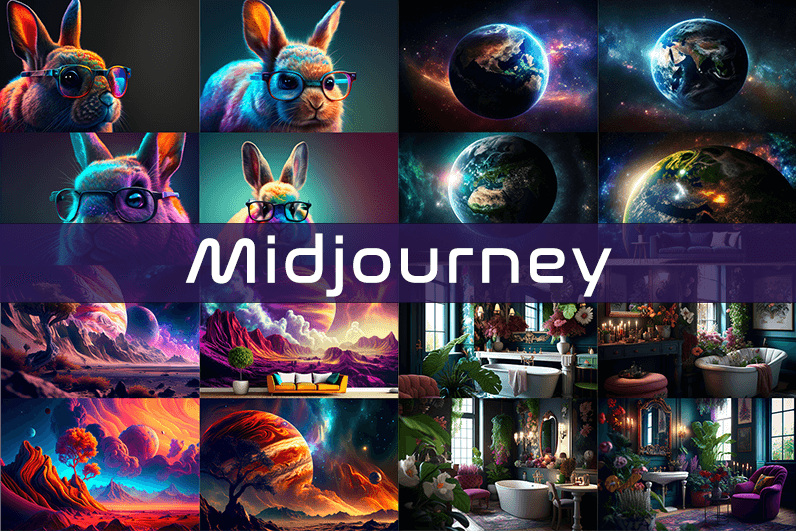
Midjourney is an AI image generation tool based on Discord, utilizing text commands to create images. You can input prompts for the type of image you’re looking for, and the system will generate the image for you. Whether it’s a dragon, an alien spaceship, a dancing puppy, or anything else, the Midjourney bot will assist you.
Key Points
- Discord-Based: Midjourney operates on Discord, so familiarity with Discord chat is necessary.
- High-Quality Images: It generates high-quality images based on text prompts.
- Artistic Styles: Capable of creating images in various artistic styles from sketches to paintings to surreal photos.
- Community Interaction: Engage with the community and participate in channels.
- Image Editing: Allows you to edit your images and create multiple variations.
- Upscaling: You can upscale your images to enlarge them.
- Customization: Fine-tune images by specifying aspect ratio, quality, and chaos levels.
- NLP Features: Excellent natural language processing features ensure accurate results.
- Version 5: The latest version, released in March 2023, is accessible to users.
- No Free Plan: Offers various paid plans according to user needs.
How We Tested the Product
I tested both simple and complex prompts, and Midjourney consistently provided accurate results. While I don’t consider myself an artist, it felt like engaging in artistic creation. You’re only limited by your imagination. It generates four images per prompt. You can select one of the four images and edit it. I tried various styles, and the results were perfect every time. Testing Midjourney felt more like fun than work.
Pros and Cons of Midjourney
Pros 👍
- Extremely easy to use; just type text prompts to generate images.
- Highly accurate results with high-quality images.
- Version 4 was great, and version 5 offers even better results.
- Provides fine-tuning features for artists.
Cons 👎
- No free trial.
- Images are public to other users, so you can’t create business designs.
- Only available on Discord.
- Limited customer support.
What is Midjourney?
Midjourney is a text-to-image generation tool powered by artificial intelligence. It uses Natural Language Processing (NLP) to interpret prompts provided by users and generates relevant images based on those prompts. Currently in version 5.2, Midjourney does not have a standalone application and operates on Discord chat. It boasts a large community where you can join channels to interact with other artists. While it can create stunning images, it is not recommended for business design purposes as all images are public.
How Does Midjourney Work?
Midjourney uses two machine learning techniques: Diffusion Model and Large Language Model. With the Large Language Model, Midjourney understands the meaning of user-entered prompts. Through diffusion, the system adds noise to the training dataset and then reverses the noise to restore the original image, training the AI to generate accurate results based on prompts.
In simpler terms, if you want to create an image of a “ladybug on a blade of grass,” AI starts with noise (like TV static) and gradually diffuses it to create an image matching your prompt, producing a clear image step by step.
Using Midjourney
Midjourney runs on Discord, a text and voice chat application. Here’s how to get started:
- Create a Discord Account: Download the Discord app or open it in your browser.
- Join Midjourney: Accept the invite to join Midjourney, available on their website.
- Enter Midjourney: Join any channel; a newbie channel is a good start. Use the search bar at the top right to find channels.
- Subscribe: You cannot create images without a subscription. Enter
/subscribein the text box to subscribe to their paid plan. - Select a Plan: It will take you to their pricing page. Subscribe to a plan and start creating images.
- Generate Images: Enter
/imagineto open the image prompt. Describe your image, and AI will create it. - Choose and Edit: You will receive four images per prompt. Select one to upscale or edit. Save the image when satisfied.
How to Upscale Images
When you generate an image, you’ll see buttons labeled U1, U2, U3, U4, V1, V2, V3, and V4. The U buttons upscale the selected image, and the V buttons create four new variations of the selected image. Right-click and save the image when you’re happy with the result.
Special Commands in Midjourney
Similar to /imagine, there are other special commands to interact with the Midjourney bot:
/askto ask a question./fastfor faster results./stealthfor stealth mode (your images won’t be visible to others)./subscribeto subscribe to a paid plan.
A full list of commands is available here.
Parameters
There are special parameters you can set with each command:
--aspect: Change the aspect ratio, e.g.,--ar 3:2for a 3:2 aspect ratio.--no: Negative prompts to exclude certain elements, e.g.,--no flowers.--tile: Create seamless images that match each other.
All Midjourney parameters can be found here.
Cost
Midjourney offers four plans:
- Basic Plan: $8/month
- Standard Plan: $24/month
- Pro Plan: $48/month
- Mega Plan: $96/month
These are annual fees, and monthly plans are slightly more expensive. The Basic Plan costs $10/month for a monthly subscription. No free trial is available. The Basic Plan allows for around 200 generations, and all your public images are visible to everyone. Stealth options are available in the Pro and Mega Plans.
Writing Creative Midjourney Prompts
Writing a generic prompt is easy, but crafting a prompt that highlights the beauty of Midjourney’s AI takes experience. Here are some tips:
- Detailed Descriptions: Provide detailed descriptions as AI might misinterpret vague terms.
- Brevity: Keep prompts concise. Longer prompts risk being ignored.
- Negative Prompts: Use negative prompts to exclude elements you don’t want, e.g., “a farm with no animals.”
- Creative Tags: Use creative tags for unusual images, e.g., “a flying dinosaur – creative.”
- Prompt Generator: Use a prompt generator to help create detailed prompts.
Is Midjourney Open Source?
Midjourney is not open source. It’s a self-funded project developed by a small team. Unlike Dall-E by OpenAI, which is open source, Midjourney’s software is not available for use, modification, or distribution. However, the images generated in public channels are “open source” in a sense, as they are publicly accessible.
Is Midjourney Safe?
Personal data provided to Midjourney is stored on their servers in the USA. The company ensures user data is safe and secure and does not sell any of your data. If you have used Midjourney, you can request data deletion by providing your email, Discord user ID, and Midjourney user ID. Publicly generated images on public channels are public and should not be used for business designs like logos.

References:
Hitnspin casino auszahlungsdauer clients1.google.td
aviator फ्री बेट aviator फ्री बेट
References:
Hitnspin casino paysafecard http://clients1.google.com.br/url?source=web&rct=j&url=https://telegra.ph/HitnSpin-Casino-Deutschland-Beste-Online-Casino-Spiele-und-Boni-06-07-2
Мамы и папы отзовитесь Замучились мы с этой обычной школой Нервы ни к чёрту у всей семьи Короче, единственная школа где кайфово учиться — онлайн образование без стресса и нервов Никаких сборов в 8 утра В общем, сохраняйте себе — Не мучайте себя и детей Перешлите другим родителям
aviator plinko rəsmi https://www.aviator42869.help
Родители отзовитесь Двойки, замечания, учителя орут Ребёнок учится ради оценок Короче, реально удобный формат — онлайн школа Москва с зачислением Уроки в удобное время В общем, жмите чтобы не потерять — лаба обучение онлайн школа https://shkola-onlajn-dyk.ru Не мучайте детей Перешлите другим родителям
chicken road depositar con skrill chicken-road39683.icu
plinko auto play https://www.plinko18370.help
References:
Hit n spin login http://images.google.co.il/url?sa=t&url=https://www.orkhonschool.edu.mn/profile/cannonkychuber5766/profile
Всем привет из КЗ То график убийственный Везде одно и то же Короче, единственный где есть нормальные предложения — вакансии в Казахстане с ежедневной оплатой График удобный В общем, там все вакансии — вакансии в казахстане вакансии в казахстане Найдите нормальную работу Перешлите тому кто ищет работу
References:
Hitnspin casino app iphone http://clients1.google.com.jm
карточка товара на вайлдберриз создание карточек товара wildberries
дизайн проект спб студия дизайна интерьера спб
aviator प्रो खिलाड़ी टिप्स aviator प्रो खिलाड़ी टिप्स
References:
Hitnspin casino legal http://coinsplanet.ru
Everything from slots to live tables is available on the official True Fortune site.
Big-money jackpots and trending games are easy to find on the homepage.
A loyalty programme rewards active players with points that convert into real bonuses.
True Fortune supports popular payment methods including Visa, Mastercard and e-wallets like Skrill and Neteller.
The casino is licensed and applies strong security to keep accounts and funds safe.
New users can check the FAQ for quick guidance on bonuses and payments.
promo code true fortune promo code true fortune
Слушайте кто ищет выход Двойки и замечания в дневнике А эти поборы на подарки учителям Короче, школа без стресса и скандалов — онлайн образование с индивидуальным расписанием Учителя объясняют доходчиво В общем, смотрите сами по ссылке — lomonosov online https://shkola-onlajn-wqe.ru Переходите на нормальное обучение Перешлите другим родителям
мостбет приложение 2026 https://mostbet78071.company/
Rasmiy saytga kirish orqali foydalanuvchilar barcha o’yin va tikish bo’limlaridan foydalanishlari mumkin.
888Starz rasmiy saytining kazino bo’limida minglab slot va stol o’yinlari mavjud.
Rasmiy sayt orqali mahalliy va xalqaro chempionatlarga, jumladan O’zbekiston ligasiga tikish mumkin.
Barcha aksiyalar va bonuslar rasmiy saytda aniq ko’rsatiladi va ulardan foydalanish oson.
Rasmiy sayt foydalanuvchilarga sutkalik yordamni bir nechta aloqa kanali orqali taqdim etadi.
вход 888starz вход 888starz
The casino welcomes players from the United Kingdom with a localised experience and responsive support.
A dedicated live casino streams real-dealer roulette, blackjack and baccarat around the clock.
A welcome offer with matched bonus funds and free spins awaits new players in the United Kingdom.
true fortune casino 50 free chip code true fortune casino 50 free chip code
Minimum deposits are low, making it easy to get started.
Responsible gambling tools let players set deposit limits, take breaks or self-exclude.
The mobile casino runs smoothly in any browser with no download required.