

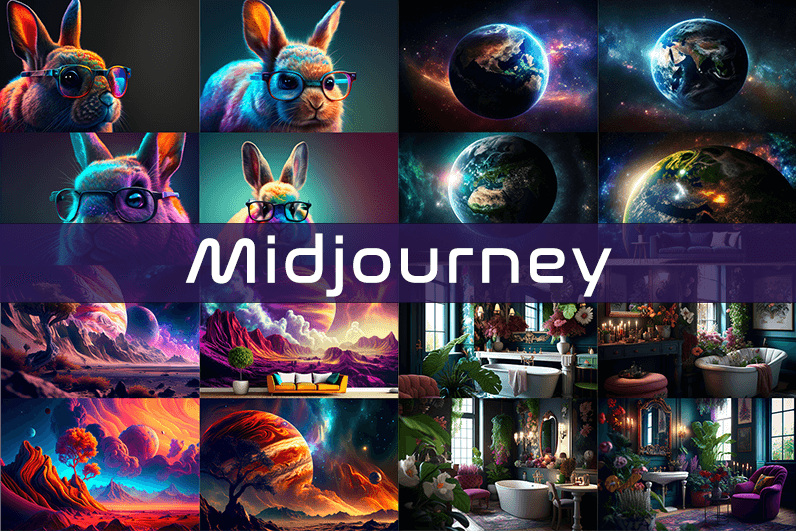
Midjourney is an AI image generation tool based on Discord, utilizing text commands to create images. You can input prompts for the type of image you’re looking for, and the system will generate the image for you. Whether it’s a dragon, an alien spaceship, a dancing puppy, or anything else, the Midjourney bot will assist you.
Key Points
- Discord-Based: Midjourney operates on Discord, so familiarity with Discord chat is necessary.
- High-Quality Images: It generates high-quality images based on text prompts.
- Artistic Styles: Capable of creating images in various artistic styles from sketches to paintings to surreal photos.
- Community Interaction: Engage with the community and participate in channels.
- Image Editing: Allows you to edit your images and create multiple variations.
- Upscaling: You can upscale your images to enlarge them.
- Customization: Fine-tune images by specifying aspect ratio, quality, and chaos levels.
- NLP Features: Excellent natural language processing features ensure accurate results.
- Version 5: The latest version, released in March 2023, is accessible to users.
- No Free Plan: Offers various paid plans according to user needs.
How We Tested the Product
I tested both simple and complex prompts, and Midjourney consistently provided accurate results. While I don’t consider myself an artist, it felt like engaging in artistic creation. You’re only limited by your imagination. It generates four images per prompt. You can select one of the four images and edit it. I tried various styles, and the results were perfect every time. Testing Midjourney felt more like fun than work.
Pros and Cons of Midjourney
Pros 👍
- Extremely easy to use; just type text prompts to generate images.
- Highly accurate results with high-quality images.
- Version 4 was great, and version 5 offers even better results.
- Provides fine-tuning features for artists.
Cons 👎
- No free trial.
- Images are public to other users, so you can’t create business designs.
- Only available on Discord.
- Limited customer support.
What is Midjourney?
Midjourney is a text-to-image generation tool powered by artificial intelligence. It uses Natural Language Processing (NLP) to interpret prompts provided by users and generates relevant images based on those prompts. Currently in version 5.2, Midjourney does not have a standalone application and operates on Discord chat. It boasts a large community where you can join channels to interact with other artists. While it can create stunning images, it is not recommended for business design purposes as all images are public.
How Does Midjourney Work?
Midjourney uses two machine learning techniques: Diffusion Model and Large Language Model. With the Large Language Model, Midjourney understands the meaning of user-entered prompts. Through diffusion, the system adds noise to the training dataset and then reverses the noise to restore the original image, training the AI to generate accurate results based on prompts.
In simpler terms, if you want to create an image of a “ladybug on a blade of grass,” AI starts with noise (like TV static) and gradually diffuses it to create an image matching your prompt, producing a clear image step by step.
Using Midjourney
Midjourney runs on Discord, a text and voice chat application. Here’s how to get started:
- Create a Discord Account: Download the Discord app or open it in your browser.
- Join Midjourney: Accept the invite to join Midjourney, available on their website.
- Enter Midjourney: Join any channel; a newbie channel is a good start. Use the search bar at the top right to find channels.
- Subscribe: You cannot create images without a subscription. Enter
/subscribein the text box to subscribe to their paid plan. - Select a Plan: It will take you to their pricing page. Subscribe to a plan and start creating images.
- Generate Images: Enter
/imagineto open the image prompt. Describe your image, and AI will create it. - Choose and Edit: You will receive four images per prompt. Select one to upscale or edit. Save the image when satisfied.
How to Upscale Images
When you generate an image, you’ll see buttons labeled U1, U2, U3, U4, V1, V2, V3, and V4. The U buttons upscale the selected image, and the V buttons create four new variations of the selected image. Right-click and save the image when you’re happy with the result.
Special Commands in Midjourney
Similar to /imagine, there are other special commands to interact with the Midjourney bot:
/askto ask a question./fastfor faster results./stealthfor stealth mode (your images won’t be visible to others)./subscribeto subscribe to a paid plan.
A full list of commands is available here.
Parameters
There are special parameters you can set with each command:
--aspect: Change the aspect ratio, e.g.,--ar 3:2for a 3:2 aspect ratio.--no: Negative prompts to exclude certain elements, e.g.,--no flowers.--tile: Create seamless images that match each other.
All Midjourney parameters can be found here.
Cost
Midjourney offers four plans:
- Basic Plan: $8/month
- Standard Plan: $24/month
- Pro Plan: $48/month
- Mega Plan: $96/month
These are annual fees, and monthly plans are slightly more expensive. The Basic Plan costs $10/month for a monthly subscription. No free trial is available. The Basic Plan allows for around 200 generations, and all your public images are visible to everyone. Stealth options are available in the Pro and Mega Plans.
Writing Creative Midjourney Prompts
Writing a generic prompt is easy, but crafting a prompt that highlights the beauty of Midjourney’s AI takes experience. Here are some tips:
- Detailed Descriptions: Provide detailed descriptions as AI might misinterpret vague terms.
- Brevity: Keep prompts concise. Longer prompts risk being ignored.
- Negative Prompts: Use negative prompts to exclude elements you don’t want, e.g., “a farm with no animals.”
- Creative Tags: Use creative tags for unusual images, e.g., “a flying dinosaur – creative.”
- Prompt Generator: Use a prompt generator to help create detailed prompts.
Is Midjourney Open Source?
Midjourney is not open source. It’s a self-funded project developed by a small team. Unlike Dall-E by OpenAI, which is open source, Midjourney’s software is not available for use, modification, or distribution. However, the images generated in public channels are “open source” in a sense, as they are publicly accessible.
Is Midjourney Safe?
Personal data provided to Midjourney is stored on their servers in the USA. The company ensures user data is safe and secure and does not sell any of your data. If you have used Midjourney, you can request data deletion by providing your email, Discord user ID, and Midjourney user ID. Publicly generated images on public channels are public and should not be used for business designs like logos.

Reading this triggered a small change in how I think about the topic going forward, and a stop at astroboard reinforced that subtle shift, the rare content that actually moves my thinking rather than just confirming or filling it is the kind I most value and this site is providing that kind of impact today.
Worth bookmarking and sharing with anyone interested in the topic, that is my honest take, and a stop at coilclose reinforces that, the kind of generous resource that makes the open web feel worth defending against the constant pressure to retreat into walled gardens and curated feeds today everywhere I look across all my devices.
Now noticing that the post never raised its voice even when making a strong point, and a look at inspiredhomelifestyle continued that calm volume, content that can make important points without resorting to typographic emphasis or emotional appeal is content that trusts its substance to do the work and this site has that confidence consistently.
Now adjusting my mental list of reliable sites for this topic, and a stop at graingrove reinforced the adjustment, the small ongoing curation work of maintaining trusted sources is one of the actual practical activities of careful reading and this site has earned a permanent place on my list for this particular subject.
Felt energised after reading rather than drained, which is unusual for online content these days, and a look at galafactors continued that good feeling, content that leaves you better than it found you is rare and worth bookmarking when you stumble across it for the first time today or any other day really.
Skipped the comments section but might come back to read it, and a stop at trendandbuy hinted at a quality reader community, sites where the comments are worth reading separately from the post are increasingly rare and signal a particular kind of audience that has grown around the editorial vision over time gradually.
Stayed longer than planned because each section earned the next, and a look at amplebench kept that pulling effect going across more pages, the kind of subtle pull that good writing exerts on attention is something I find harder and harder to resist when I encounter it on the open web today.
Now thinking about how to apply some of this to a project I have been planning, and a look at boundboard added more material for the planning, content that connects to my actual creative work rather than just being interesting in the abstract is the kind that earns priority placement in my reading rotation consistently going forward.
Comfortable read, finished it without realising how much time had passed, and a look at gailcooperspeaker pulled me into more pages the same way, the absence of friction in good content lets time disappear and that is one of the highest compliments I can pay any piece of writing I find online during a regular search session.
Now adding a small note in my reading log that this site is one to watch, and a look at intentionalmodernmarket reinforced the watch status, the few sites I track deliberately rather than encounter accidentally are sites I expect ongoing returns from and this one has cleared the bar for that elevated tracking based on what I read.
Great work on keeping things readable, the post never drags or repeats itself which I really appreciate, and a stop at refinedlivingessentials added a bit more context that fit naturally with what was already said here, no need to read everything twice to get the point being made today.
Took the time to read every paragraph rather than skimming for the punchline, and a quick visit to beechcell earned the same careful attention from me, that is the highest signal I can give about content quality because my default mode is rapid scanning rather than deliberate reading on most pages.
Started forming counter examples to test the claims and the post handled most of them implicitly, and a look at autumnriverattic continued that anticipatory style, writers who think two steps ahead of the critical reader save themselves from a lot of follow up work and this writer has clearly internalised that habit consistently.
A clean read with no irritations, and a look at cormira continued that frictionless quality, the absence of small irritations is something I notice only when present elsewhere and this site is one of the rare places where everything just works and lets me focus on the substance rather than fighting the format.
Skimmed first and then went back to read carefully, and the careful read paid off in places I had missed, and a stop at brightorchardhub got the same treatment, the rare site whose content rewards a second pass is content I want more of in my regular rotation rather than disposable single read articles.
Reading this gave me something to think about for the rest of the afternoon, and after orqanta I had even more to mull over, the kind of post that lingers in the background of your day rather than evaporating immediately is genuinely valuable in an attention economy that punishes depth rather than rewarding it.
Now noticing that the post benefited from being neither too short nor too long for its content, and a look at byrdclap continued that calibration of length, sites that match length to content rather than padding to hit some target are sites that respect both their material and their readers and this site does both.
Walked away in a slightly better mood than when I started reading, that says something about the writing, and a stop at autumnbay kept that going, content that leaves you feeling more capable rather than overwhelmed is the kind I keep coming back to again and again over the years and across many topics.
Reading this on a slow Sunday and finding it perfectly suited to a slow Sunday read, and a quick stop at carefullybuiltcommerce kept the same gentle pace, content that fits the mood of the moment is something I notice and remember and this site has the kind of pace that suits relaxed reading sessions especially well.
Picked this up between two other things I was doing and got drawn in completely, and after authenticlivingmarket my original tasks were completely forgotten for a while, content that derails a workflow in a positive way by being more interesting than what you were already doing is rare and worth recognising clearly.