The Meta Ad Library shows you great ads, then quietly takes them away. Foreplay’s Swipe File adds a one-click save button to Meta, TikTok and LinkedIn, and keeps every ad you save for good, with the video, the copy and the landing page attached.
Visit Site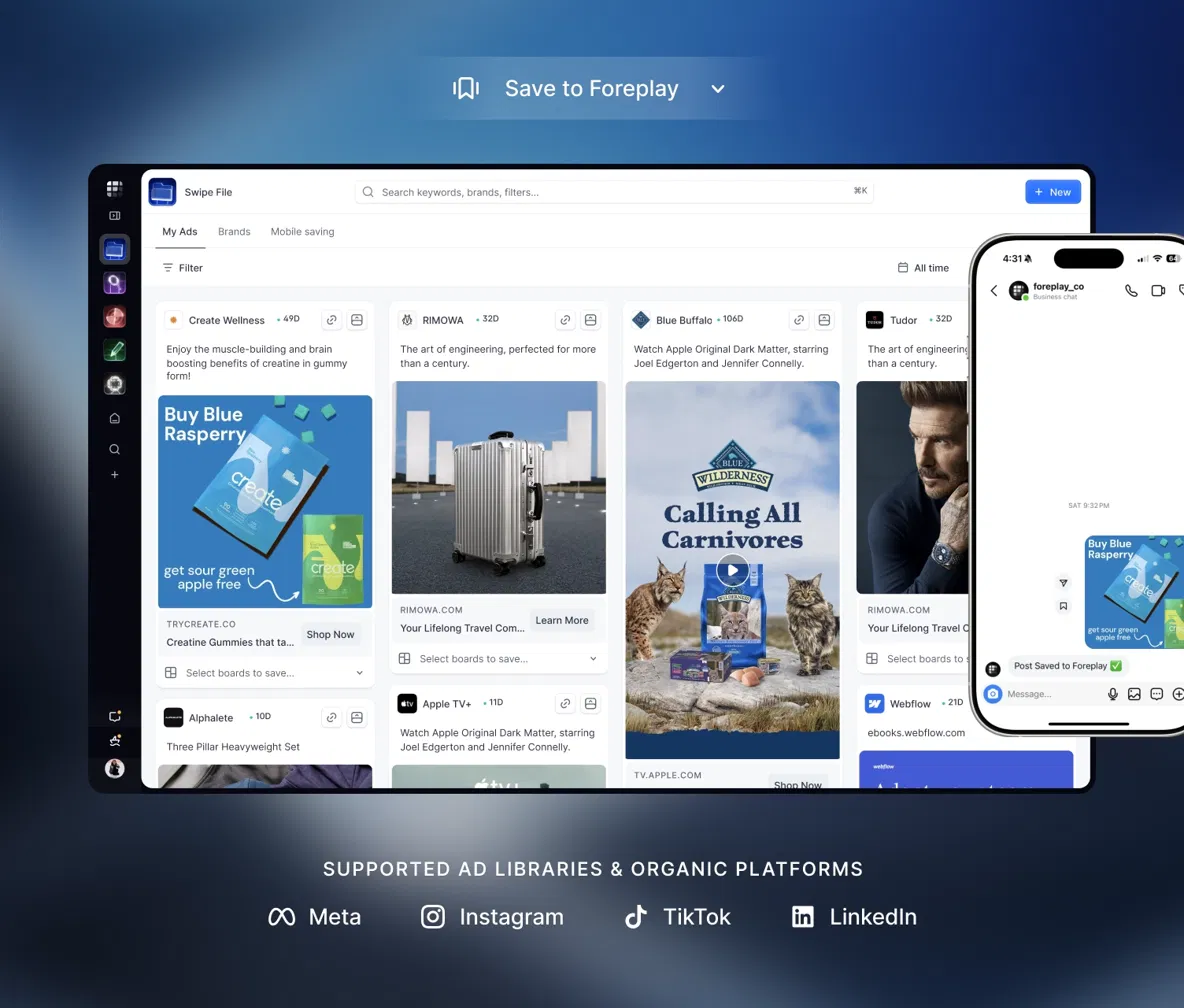
Why Saving Facebook Ads Is So Annoying
Every media buyer has lost an ad they meant to keep. You find a great hook in the Meta Ad Library, think “I’ll come back to this,” and a week later it’s gone. The advertiser paused it, and with it went the one reference you needed for Monday’s creative meeting.
The problem is built in. For regular commercial ads, the Ad Library is mostly a window into what’s running right now. There’s no save button, no folders and no way to keep a video once it stops running. So people screenshot. Or screen-record. Or paste links into a Google Doc that’s dead by the end of the quarter.
That’s exactly the gap Foreplay was built to close. Swipe File is the feature the whole product started with, and honestly, it’s still the reason most teams sign up.
What Foreplay’s Swipe File Actually Does
Think of it as a Pinterest board for ads, except every pin keeps the original video, the full ad copy, the CTA and the landing page. A few things happen every time you hit save:
- The ad is stored permanently in your account, even after the advertiser kills it.
- Video ads get transcribed automatically, so you can search by what was said, not just by brand.
- The landing page is screenshotted in full, on desktop and mobile. Handy when the page changes next month.
- Live status is tracked, so you can see whether the ad is still running and for how long. An ad running for 90+ days is usually making money.
“It easily saves us 1-2 hours per day.”— Matthew Williams, CMO at iStack
How to Save Facebook Ads with Foreplay (Step by Step)
- Step 01: Start your 7-day free trial. Basic is enough if all you need is Swipe File.
- Step 02: Install the Foreplay Chrome extension and sign in.
- Step 03: Open the Meta Ad Library and search for any brand. A “Save to Foreplay” button now sits on every ad card.
- Step 04: Click it and pick a board. Image, video, carousel and dynamic ads all work, in any aspect ratio.
- Step 05: Repeat on TikTok’s Ad Library and Top Ads, the LinkedIn Ad Library, Instagram, TikTok organic and YouTube Shorts.
- Step 06: On your phone, use the Foreplay mobile app to save ads you spot while scrolling Instagram or TikTok.
That’s it. The first save takes about ten seconds. After that it becomes a reflex, which is the whole point.
Organizing Your Swipe File So You’ll Actually Use It
A swipe file with 2,000 random ads is just a prettier junk drawer. Here’s a setup that works for most teams:
- One board per client or product line, not per platform. You’ll search by brand far more often than by “TikTok.”
- Boards for angles: “Us vs. them,” “UGC testimonials,” “Founder story,” “Offer-led.” These become instant references when you build a brief.
- Custom tags for hooks like “question hook,” “pattern interrupt” or “stat hook,” so you can pull every example of one in seconds.
- Use AI search for the stuff you didn’t tag. Type “skincare ad with a before and after” and let the transcripts do the work.
- Check the running time before you copy an idea. Something that ran for two days probably flopped.
Sharing Ads With Your Team and Clients
This is where Swipe File stops being a personal bookmark tool and turns into a team workflow. Boards can be shared through public links that open without a Foreplay account, so a client, a freelance editor or a UGC creator can see exactly what you mean. No more “the one with the guy in the kitchen, you know?”
Your team can leave comments directly on saved ads, and you can embed ads in Notion or on a web page. For agencies, a well-built board often does more in a client call than a 20-slide deck. If your team is still trading screenshots in Slack, moving that into shared Foreplay boards is the fastest win you’ll get this quarter.
Swipe File vs. Screenshots vs. Manual Downloads
| Screenshots / Google Drive | Manual video downloads | Foreplay Swipe File | |
|---|---|---|---|
| Keeps the ad after it stops running | Only the still image | Yes, if you remembered | Yes, automatically |
| Video and full ad copy | No | Video only | Both |
| Landing page saved | No | No | Desktop + mobile |
| Searchable by what’s said | No | No | Yes, via transcripts |
| Shareable with a client | Messy | Large files | One link |
| Time per save | ~1 minute | 2-5 minutes | One click |
Pros & Cons
Pros- Ads are saved forever, even after they leave the Ad Library
- Works across Meta, TikTok, LinkedIn, Instagram and YouTube Shorts
- Automatic transcripts and landing page screenshots
- Unlimited saves on every plan
- Clean, shareable boards that clients can open without an account
- No free-forever plan; you need a paid plan after the trial
- Chrome only, no Firefox extension
- Google ads saving isn’t live yet
- Easy to over-save; you still need a system to keep it useful
How Much Does It Cost?
Swipe File is included in every Foreplay plan, so you don’t need to pay for the bigger tiers just to save ads. The Basic plan is $59/month, or $49/month billed annually, and also includes Discovery (the 200M+ ad search engine) and Briefs. Workflow ($175/month) adds competitor tracking and creative analytics, which you can read about in our full Foreplay review.
💰 Try Foreplay Swipe File (Updated August 2026)
Is Foreplay Swipe File Worth It?
If you look at competitor ads more than once a week, yes. The math is simple: one lost reference costs you more time than a month of Basic. And the habit it builds, saving every interesting ad the moment you see it, quietly makes every brief and every creative review better.
It’s not for everyone. If you check the Ad Library twice a year, a few screenshots will do. But if creative is part of your job, the difference between “I saw something like this once” and “here’s the exact ad, the script and the landing page” is huge.
Give it a week. Save every ad that catches your eye, build two or three boards, and share one with your team. If it doesn’t change how your next creative meeting goes, cancel before the trial ends. Most people don’t.
Visit SiteFAQs
- Can you download ads from the Facebook Ad Library?
- Not in any convenient way. The Ad Library has no save or download button for regular commercial ads. Foreplay adds a one-click save button so the ad, its copy and its video are stored in your own account.
- Do saved ads stay in Foreplay after the advertiser turns them off?
- Yes. Once an ad is in your Swipe File it stays there permanently, even after it disappears from the Meta Ad Library.
- Which platforms can Foreplay save ads from?
- Meta Ad Library, Instagram organic, TikTok Ad Library and Top Ads, TikTok organic, LinkedIn Ad Library and YouTube Shorts.
- Is the Foreplay Chrome extension free?
- The extension is free to install, but saved ads live in a Foreplay account. Swipe File is included in every plan, starting with Basic at $59/month ($49 billed annually), and every plan has a 7-day free trial.
- Can I share saved ads with people who don’t have Foreplay?
- Yes. Boards can be shared through public links that open without a Foreplay account, which makes them easy to send to clients, freelancers or creators.
Originally published: · Last updated: (pricing and features re-checked).