Spyder watches your competitors’ Meta ads around the clock and keeps every one of them, even after they’re switched off. You see what they launch, what they’re testing, which hooks they keep coming back to and where they send the traffic, without opening the Ad Library once.
Visit Site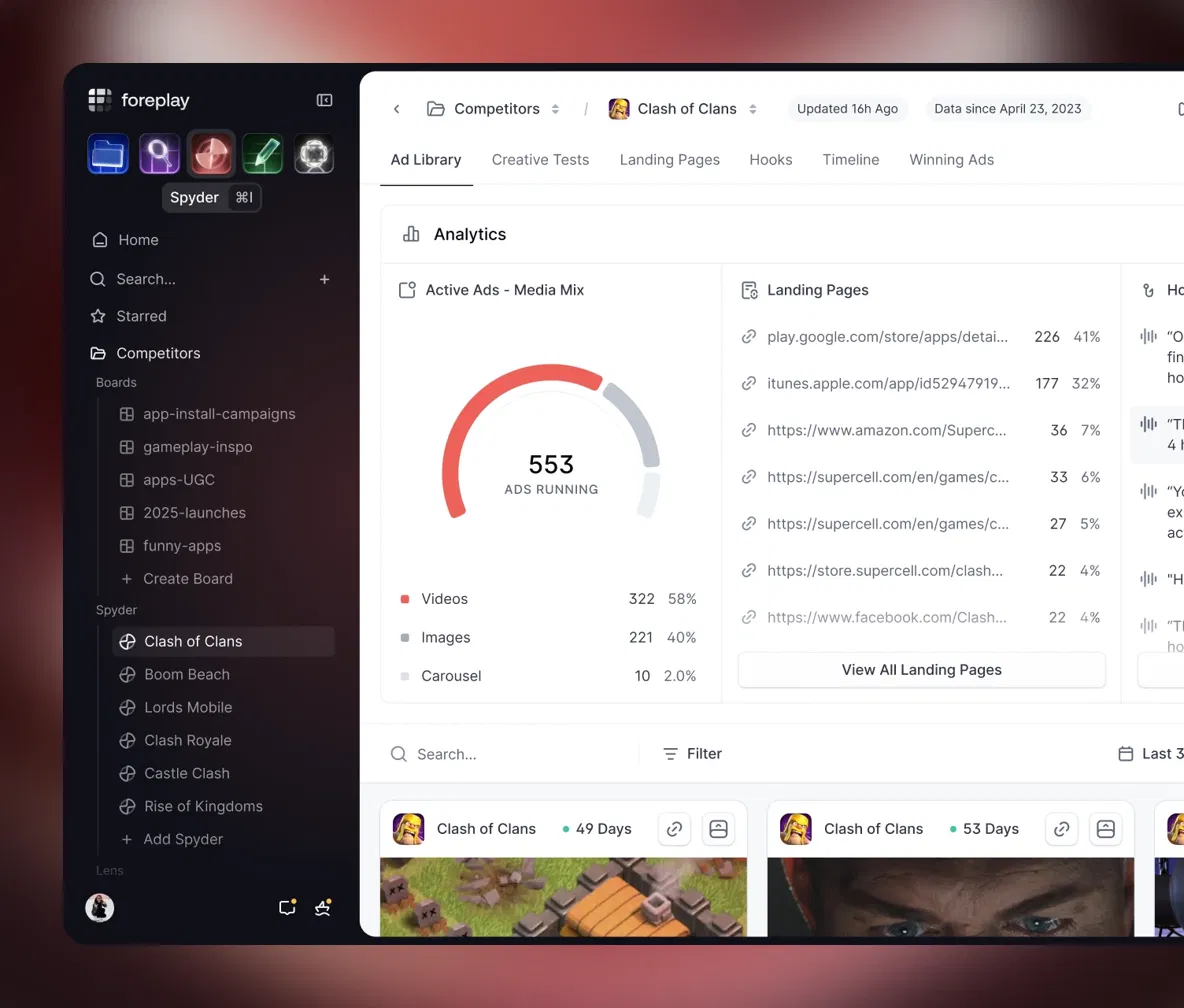
You’re Probably Checking Competitor Ads the Hard Way
Here’s how most teams do competitor research. Someone remembers on a Friday afternoon, opens the Meta Ad Library, types in three brand names and scrolls. They screenshot a few ads, drop them in Slack, and nobody looks at them again until the next “hey, what are they running now?” message.
The trouble isn’t effort, it’s memory. The Ad Library only shows you a snapshot. You can’t tell what changed since last month, which ads quietly died after four days, or which one has been running since spring and is clearly paying the bills. That’s the information that actually matters.
Foreplay Spyder fills in the gaps by doing the checking for you, every day, and keeping the history.
What Is Foreplay Spyder?
Spyder is Foreplay’s automated competitor tracker. You add a brand once, and from then on it scrapes their Meta ads (Facebook and Instagram) 24/7. Every ad is saved permanently, transcribed and organized into views that answer the questions a creative strategist actually asks.
It sits alongside Swipe File, which saves ads you pick by hand, and Discovery, which searches the whole market. Spyder is the one that focuses on the five or ten brands you really care about.
“Every time I use Spyder, it feels like an unfair advantage.”— Stephen Hakami, Founder at Wiza
What Spyder Shows You
- Ad Library view: every ad the brand is running now, plus the ones it already stopped, with how long each one lasted.
- Media mix: how their spend is split between video, static images and carousels. If a competitor suddenly moves from 70% video to mostly statics, that’s worth knowing.
- Creative tests: Spyder groups ads that launched together, so you can see exactly what they were testing against what.
- Top hooks: the opening lines of their video ads, transcribed and ranked, so you can spot the hook they keep reusing.
- Landing pages: which pages and offers get the most ads pointed at them. That’s usually where the money is.
- Timeline: a visual history of when ads went live and when they died, going back up to three years.
- Updates by Slack or email: new creative from a tracked brand shows up where your team already works.
How to Set Up Spyder in 10 Minutes
- Step 01: Start a 7-day free trial on the Workflow plan. Spyder isn’t part of Basic.
- Step 02: Open Spyder and click “Add Spyder.” Search for a competitor’s Facebook page.
- Step 03: Add your three to five closest competitors first, then one or two brands outside your niche whose ads you admire.
- Step 04: Group them in a folder per client or product line so reports stay clean.
- Step 05: Turn on Slack or email updates so new launches come to you.
- Step 06: Come back in 24 hours. Your first full picture of each brand will be waiting.
A 20-Minute Weekly Competitor Review
Spyder is only useful if someone actually looks at it. This is the routine we’d recommend for Monday mornings:
- New launches (5 min): skim what each competitor started running in the last seven days. Note anything that’s a new angle, not just a new color.
- Survivors (5 min): check which ads from two or three weeks ago are still live. Those are the ones that passed their test.
- Hooks (5 min): open the hooks view and copy any opening line that appears in three or more ads. Repetition means it’s working.
- Landing pages (5 min): see if the traffic is shifting to a new offer or page. Offers often change before the ads do.
Twenty minutes, once a week, and you’ll know more about your competitors’ creative strategy than most of their own interns.
How to Read a Competitor’s Creative Tests
This is where Spyder gets genuinely useful, and where a lot of people misread the data. A few rules of thumb:
Lots of versions of one idea means they’re testing, not winning. If a brand launches eight variations of the same concept, they haven’t found the answer yet. Wait two weeks and see which one survives.
Survival is the signal. Nobody keeps paying for an ad that doesn’t convert. An ad that’s still running after 30 or 60 days has almost certainly earned its place.
Follow the landing pages. When most new ads suddenly point to one page or bundle, the brand is telling you where its margin is.
Don’t copy, translate. The goal isn’t to clone a competitor’s ad. It’s to understand why it works, then build your own version for your product and audience.
Spyder vs. Checking the Ad Library by Hand
| Meta Ad Library (manual) | Foreplay Spyder | |
|---|---|---|
| Checks for new ads | Whenever someone remembers | Automatically, 24/7 |
| Ads that already stopped running | Mostly gone | Kept, up to 3 years of history |
| Creative tests grouped | No | Yes |
| Hooks transcribed and ranked | No | Yes |
| Landing page breakdown | No | Yes |
| Alerts on new launches | No | Slack and email |
| Time per competitor per week | 20-30 minutes | A few minutes |
If you track more than two competitors, the manual way stops scaling fast. Spyder is what lets one person keep an eye on a whole market.
Pros & Cons
Pros- Tracks competitors automatically, so nothing slips through
- Keeps up to three years of ad history, including dead ads
- Creative test grouping and hook ranking save hours of guesswork
- Landing page view shows where competitors put their money
- Unlimited tracked brands on annual Workflow and Agency plans
- Not included in the Basic plan
- Covers Meta (Facebook and Instagram) only, not TikTok or Google
- Shows how long ads run, not their actual spend or ROAS
- Monthly plans cap the number of tracked brands
How Much Does Spyder Cost?
Spyder comes with the Workflow plan at $175/month, or $149/month billed annually. Monthly billing covers 15 tracked brands; paying annually removes the limit entirely. Workflow also includes 5 seats, Lens creative analytics for your own ad account, Swipe File, Discovery and Briefs. Agencies tracking lots of client markets can step up to the Agency plan ($459/month or $389/month annually, 50 brands monthly or unlimited annually). The full Foreplay review compares every plan side by side.
💰 Try Foreplay Spyder (Updated July 2026)
Is Foreplay Spyder Worth It?
If you’re spending real money on Meta ads in a competitive market, Spyder is one of the easiest tools to justify. It replaces a chore that usually gets skipped with a feed that updates itself, and it remembers everything your team would forget.
Be realistic about what it is. Spyder can’t tell you a competitor’s exact spend or return, and it won’t think for you. But knowing what survived, what got retired and where the traffic is going gets you about 80% of the way to a smart test plan, and a much better creative brief.
Try it this way: add your three biggest competitors on day one of the trial and run the 20-minute review a week later. If you don’t walk away with at least one test idea you wouldn’t have had otherwise, cancel and keep doing it by hand. We’d be surprised.
Visit SiteFAQs
- What does Foreplay Spyder track?
- Spyder tracks a brand’s Meta ads, meaning Facebook and Instagram, 24/7. It saves every ad permanently along with transcripts, landing pages, creative test groupings and a timeline of when each ad ran.
- How many competitors can I track with Spyder?
- The Workflow plan covers 15 brands on monthly billing and unlimited brands on annual billing. The Agency plan covers 50 brands monthly or unlimited annually. Spyder is not included in Basic.
- Can Spyder show a competitor’s ad spend or ROAS?
- No. Meta doesn’t make that data public for regular commercial ads. Spyder shows how long each ad has been running, which is the best public signal of what’s working.
- Is it okay to track competitor ads?
- Spyder works from the Meta Ad Library, which Meta makes public for transparency. Studying competitor ads is standard practice; just don’t copy their creative, trademarks or claims outright.
- Does Spyder track TikTok or Google ads?
- Not currently. Spyder focuses on Meta ads. You can still save TikTok and LinkedIn ads manually with Foreplay’s Swipe File.
Originally published: · Last updated: (pricing and features re-checked).