

The basic version of Leonardo AI is available for free, although it comes with a daily limit of 150 tokens. For those who need more capabilities and fewer restrictions, premium plans start at $10 per month. However, the free version is sufficient for most beginners. It is recommended to try the free version before opting for the paid one. Here is your guide to creating images with Leonardo AI.
Here are 5 steps to get started with Leonardo AI:
Start:
Go to the Leonardo AI App:
You can sign in with your Apple, Google, Microsoft account, or email account. Then, sign in with your newly created account.
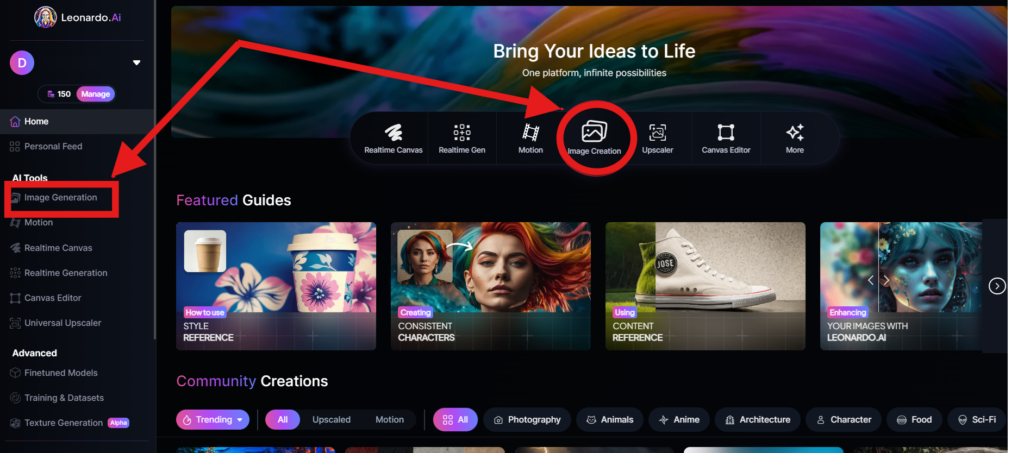
Navigate to the image creation tool
On the app.leonardo.ai homepage, select the ‘Image Generation’ option from the left panel, click on the icon in the middle or use the ‘Image Creation’ button located in the middle
Create your first image
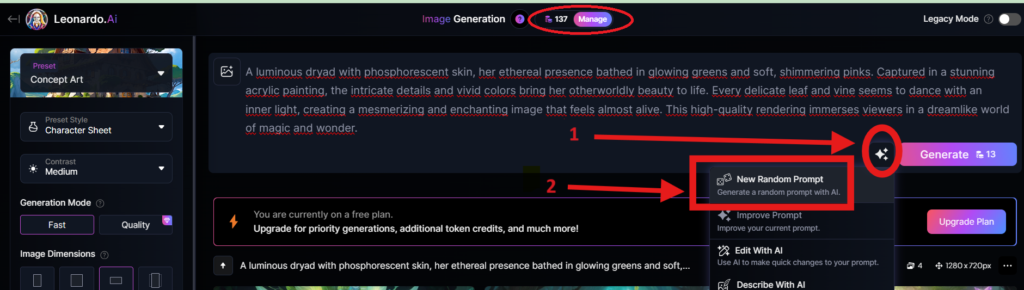
In the prompt field at the top you can immediately create your desired Image. Or you can also create a reminder with the available AI suggestions in 2 ways:
+ Generate a random photo: 1, Click to “New Random Prompt” then 2. click Generate
+ Create a photo with an AI description by an image that you want to get the original idea. Then you edit according to your creativity
Wait about 20 seconds for Leonardo AI to generate the images, and you will receive four stunning high-resolution images as follows:
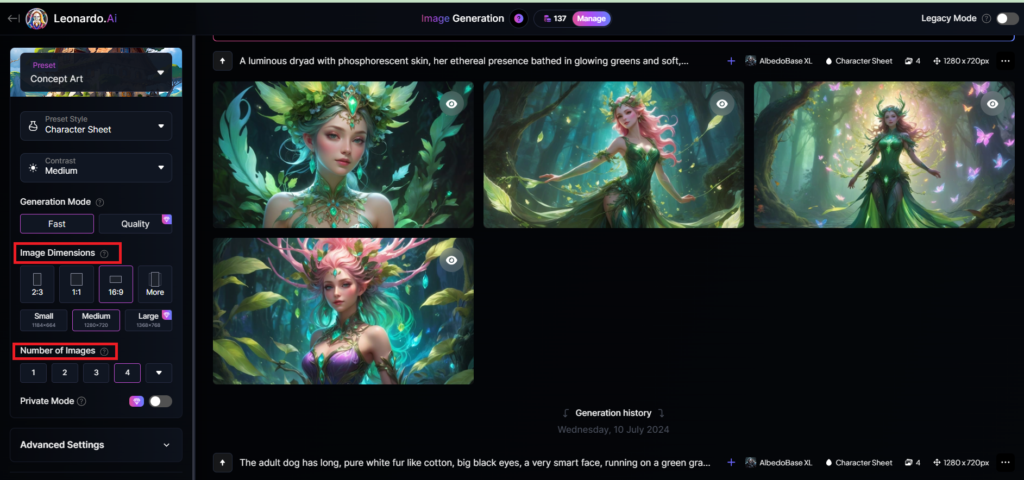
You can select the image size in the “Image Dimensions” section, which includes sizes like 2:3, 1:1, 16:9, and more options under “More” on the left. Alternatively, you can choose the number of images in the “Number of Images” section, with a maximum of 8 images that can be generated.
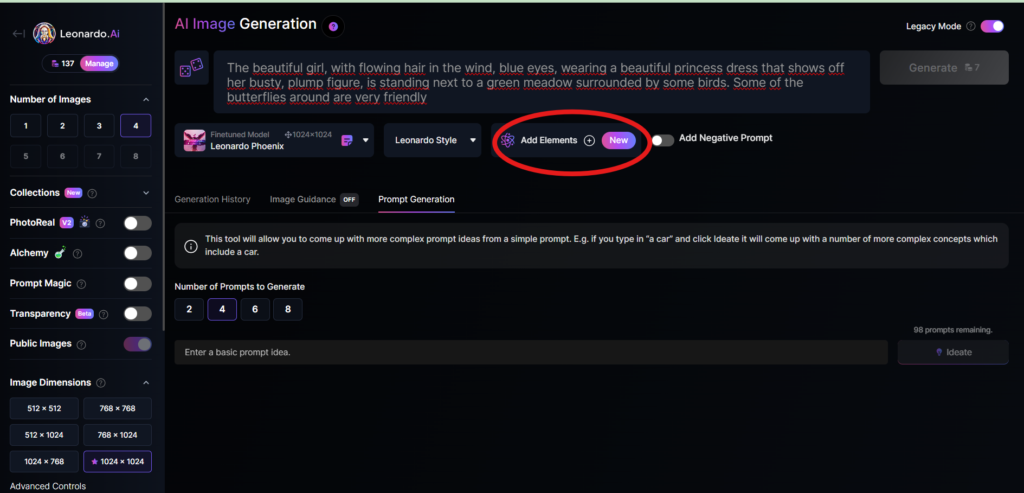
Add Elements
Use the drop-down menu under “Add Elements” to select a specific element such as Coloring Book, Folk Art Illustration, Children’s Illustration, Cartoon & Anime, or Classic Style Christmas Illustration. Although you can select multiple elements, Leonardo advises that choosing more than two elements may lead to unpredictable results.
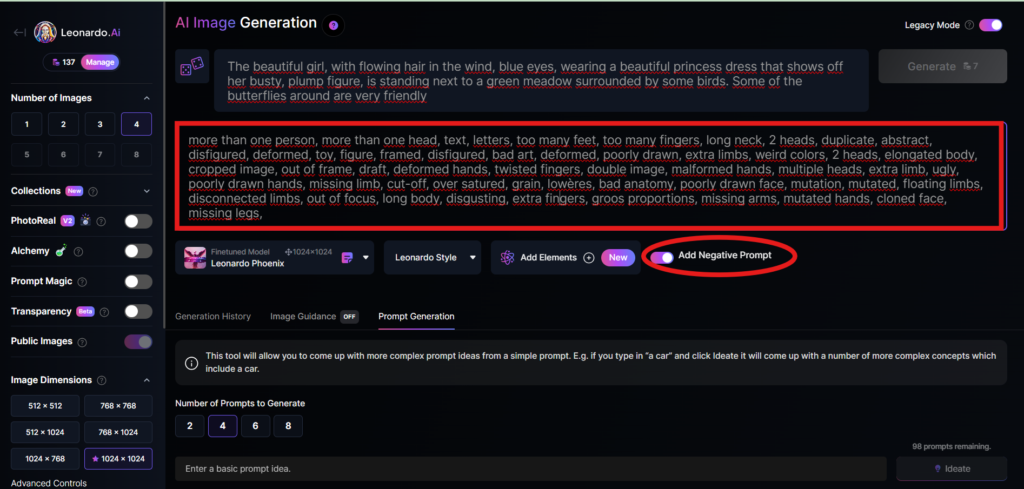
Add a negative prompt
As in the example above, I created negative prompts to ensure the resulting images were error-free, including: “more than one person, more than one head, text, letters, too many feet, too many fingers, long neck, 2 heads, duplicate, abstract, disfigured, deformed, toy, figure, framed, disfigured, bad art, deformed, poorly drawn, extra limbs, weird colors, 2 heads, elongated body, cropped image, out of frame, draft, deformed hands, twisted fingers, double image, malformed hands, multiple heads, extra limb, ugly, poorly drawn hands, missing limb, cut-off, over satured, grain, lowères, bad anatomy, poorly drawn face, mutation, mutated, floating limbs, disconnected limbs, out of focus, long body, disgusting, extra fingers, groos proportions, missing arms, mutated hands, cloned face, missing legs,”
Here are the basic steps for new users to create a simple image with Leonardo AI. In the next article, I will guide you through advanced details to create various types of images for different purposes. You can start your free trial with Leonardo AI here:

Купить Мефедрон, Бошки, Марихуану, Гашиш, Экстази Урб 597 либо перорально либо нозально, дозировка – 5-10мг, эффекты описаны в энциклопедии,у меня вообще когда порошок кидаешь и ациком заливаешь, раствор абсолютно прозрачный-.- и не прет вообще тупо куришь траву….. а вот кристалы не расворимые тоже имеются, я уже и толочь пытался седня и нагревом все бестолку…Обязательно позвонить должны, как позвонят легче забрать самому чем ждать пока курьер доставит
создание стенда для выставки стенд компании на выставке
Купить Мефедрон, Бошки, Марихуану, Гашиш, Экстази магаз ровный спасибо 5+Встану на пробу новых веществ сочный трип со мнойВсе Вась,извини..с утра заматался))
b blsp ap
This is a very informative post about online casinos and betting platforms.
I especially liked how it explains the importance of choosing a trusted site before signing up.
Many players often ask where they can find reliable gaming
platforms with fair odds and smooth payouts. From what I’ve seen, checking platforms like vn22vip helps users compare features, bonuses, and overall experience.
Thanks for sharing these insights — they’re helpful for
both beginners and experienced bettors.
You really make it seem so easy with your presentation but I find
this matter to be actually something that I think I would never understand.
It seems too complicated and very broad for me.
I am looking forward for your next post, I’ll try to get the hang of it!
Обратите внимание на золотое колье с бриллиантом купить и подчеркните свою индивидуальность!
Украшение в виде ожерелья с бриллиантами всегда привлекает внимание и вызывает восхищение.
Многие женщины выбирают его для особых случаев или в качестве подарка.
Мастера создают ожерелья с бриллиантами в разнообразных стилях, от классических до современных.
Только в этом случае можно быть уверенным в долговечности и ценности украшения.
Элегантность и изысканность делают его незаменимым аксессуаром для особых случаев.
Бриллианты всегда привлекают внимание и вызывают восторг у окружающих.
Это поможет создать завершенный и элегантный образ.
Стоимость таких изделий варьируется в зависимости от качества и дизайна, поэтому важно внимательно подходить к покупке.
References:
Time slots https://movie.nanuly.kr/@claudiasob0482?page=about
Использование очищение организма с помощью масла считается одним из натуральных способов поддержать здоровье и улучшить функционирование внутренних систем организма.
Важно избегать вредных продуктов и соблюдать водный режим для максимальной эффективности очищения.
https://roulette.team/ko/
It’s impressive that you are getting ideas from
this piece of writing as well as from our dialogue made here.
Also visit my homepage … ความงาม
блекспрут android
https://www.babelcube.com/user/1xbet-promo-code-for-free-bet
Купить Мефедрон, Бошки, Марихуану, Гашиш, Экстази Вы то нет:) А банки работают:)Ребята, магаз ровный и немелочный, берите смеломои близкий поделился вашими контактами когда про бывали ваш товар)
Купить Мефедрон, Бошки, Марихуану, Гашиш, Экстази Делали заказ на 10 гр. АМ-2233, вместо чего прислали 6,82 гр.было бы что хорошего писать. Ато культурных слов нету!!! Вроде как норм качество, готовые клады и цена это единственное что радовало. А в последнее время вообще непонятно что отвечает по часу, пугает игнорами, и в последний раз оплатил в 18:00 адрес около 22:00 и нету!!! Начал про подробности у него вроде так отвечал, фото присылал что аж хватит ему на портфолио. То курьер не ответил то он молчит. И в конце концов пишу ему с другой номера отвечает и предлагает адреса а с моего нефига. И вот такая история о том как чем ЗАЗНАЛСЯ ну или оператор. Жаль возьню(действительно было в лом,спасибо)
Купить Мефедрон, Бошки, Марихуану, Гашиш, Экстази Та же фигня.Брал у другого магазина – полная Чляпа оказалась…Всё отлично все всё получат магаз ровный доказал свой гибгий подход к НАМ заказчикам.Если форс мажёр то всё уладят в НАШу пользу.Отправка осуществляется от 2-10дней в зависимости от заказов то есть загруженности магазина.Без паники братья без паники.
UU88 là cổng game giải trí trực tuyến uy tín hàng đầu năm 2026, mang đến hệ sinh thái cá cược đa dạng gồm thể thao, casino trực tuyến, nổ hũ, bắn cá và game bài đổi thưởng.
Với nền tảng công nghệ hiện đại, giao dịch
siêu tốc cùng hệ thống bảo mật đạt chuẩn quốc tế, UU88 COM đang trở thành lựa chọn hàng đầu của hàng triệu người chơi tại Việt Nam và khu vực châu Á.
Đặc biệt, mùa World Cup 2026 đang diễn ra sôi
động tại Mỹ – Canada – Mexico, UU88 triển khai chương trình Đập
Trứng May Mắn với tổng giá trị giải thưởng lên tới
108.888K, mang đến cơ hội săn thưởng cực lớn dành cho tất cả hội
viên.
https://xn--h1adbblf7a5b.xn--p1ai/bonus-promokod-1win-1w2026ru-bonus-500/
http m blsp at
Заправка принтера Мы понимаем, как важна для вас заправка принтера, поэтому работаем без выходных и праздников. Ваш принтер будет готов к печати в самый нужный момент.