

The basic version of Leonardo AI is available for free, although it comes with a daily limit of 150 tokens. For those who need more capabilities and fewer restrictions, premium plans start at $10 per month. However, the free version is sufficient for most beginners. It is recommended to try the free version before opting for the paid one. Here is your guide to creating images with Leonardo AI.
Here are 5 steps to get started with Leonardo AI:
Start:
Go to the Leonardo AI App:
You can sign in with your Apple, Google, Microsoft account, or email account. Then, sign in with your newly created account.
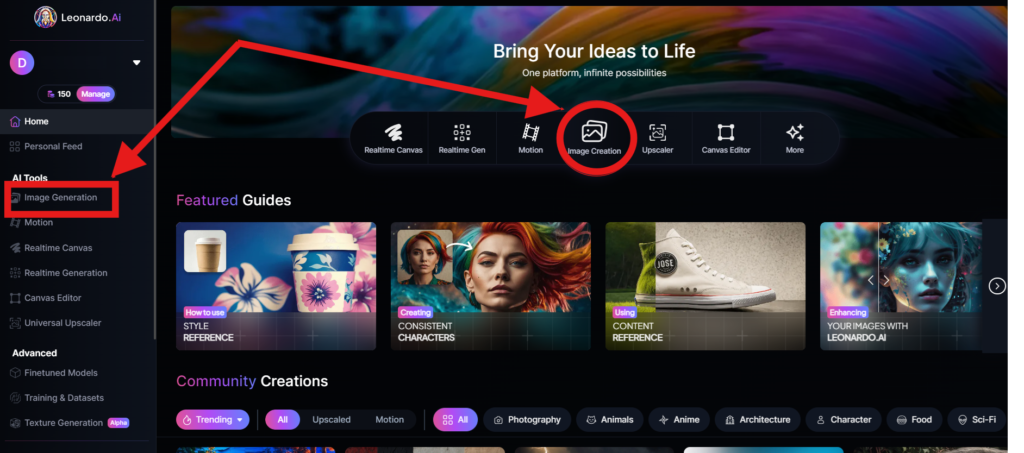
Navigate to the image creation tool
On the app.leonardo.ai homepage, select the ‘Image Generation’ option from the left panel, click on the icon in the middle or use the ‘Image Creation’ button located in the middle
Create your first image
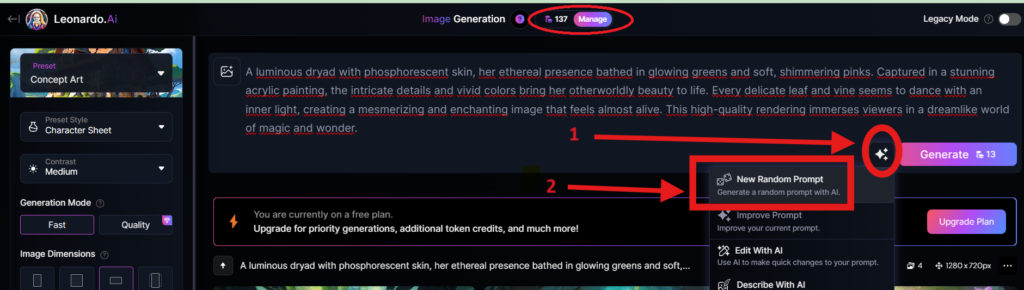
In the prompt field at the top you can immediately create your desired Image. Or you can also create a reminder with the available AI suggestions in 2 ways:
+ Generate a random photo: 1, Click to “New Random Prompt” then 2. click Generate
+ Create a photo with an AI description by an image that you want to get the original idea. Then you edit according to your creativity
Wait about 20 seconds for Leonardo AI to generate the images, and you will receive four stunning high-resolution images as follows:
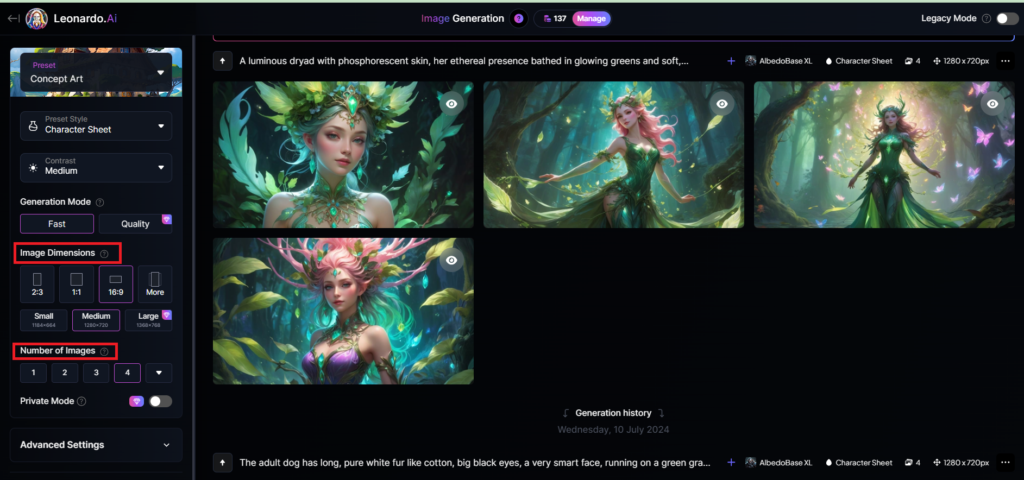
You can select the image size in the “Image Dimensions” section, which includes sizes like 2:3, 1:1, 16:9, and more options under “More” on the left. Alternatively, you can choose the number of images in the “Number of Images” section, with a maximum of 8 images that can be generated.
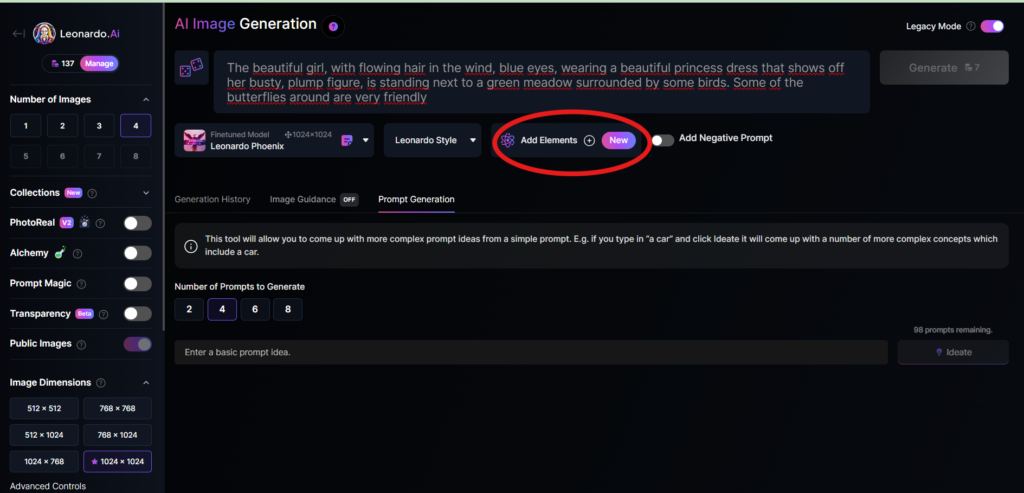
Add Elements
Use the drop-down menu under “Add Elements” to select a specific element such as Coloring Book, Folk Art Illustration, Children’s Illustration, Cartoon & Anime, or Classic Style Christmas Illustration. Although you can select multiple elements, Leonardo advises that choosing more than two elements may lead to unpredictable results.
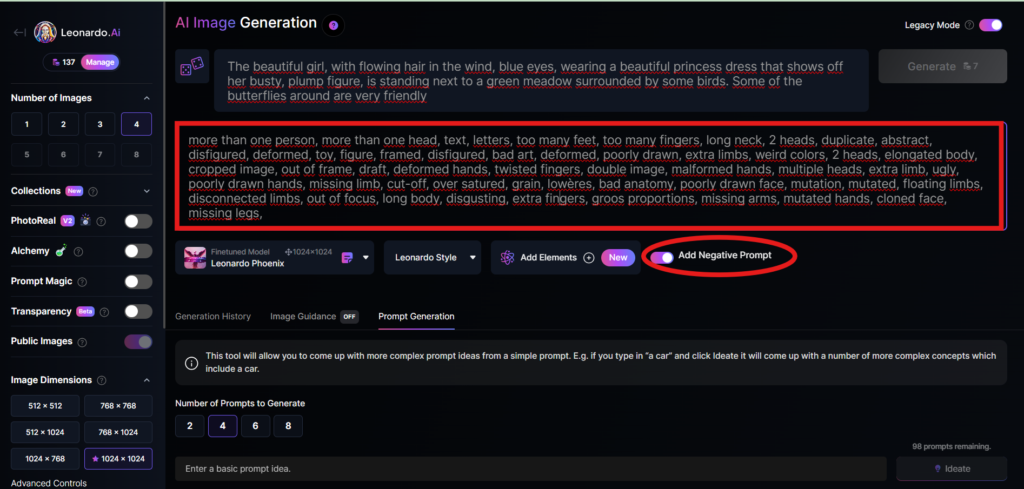
Add a negative prompt
As in the example above, I created negative prompts to ensure the resulting images were error-free, including: “more than one person, more than one head, text, letters, too many feet, too many fingers, long neck, 2 heads, duplicate, abstract, disfigured, deformed, toy, figure, framed, disfigured, bad art, deformed, poorly drawn, extra limbs, weird colors, 2 heads, elongated body, cropped image, out of frame, draft, deformed hands, twisted fingers, double image, malformed hands, multiple heads, extra limb, ugly, poorly drawn hands, missing limb, cut-off, over satured, grain, lowères, bad anatomy, poorly drawn face, mutation, mutated, floating limbs, disconnected limbs, out of focus, long body, disgusting, extra fingers, groos proportions, missing arms, mutated hands, cloned face, missing legs,”
Here are the basic steps for new users to create a simple image with Leonardo AI. In the next article, I will guide you through advanced details to create various types of images for different purposes. You can start your free trial with Leonardo AI here:


Right here is the right website for anybody who really wants to find out about this topic.
You understand a whole lot its almost hard to argue with you
(not that I personally will need to…HaHa). You certainly put a brand new spin on a subject that has
been written about for a long time. Great stuff,
just excellent!
Useful advice! For more, visit pensiones en Arzúa .
I found this very interesting. For more, visit Movers Service .
Todo lo que debes saber antes de comprar amplificadores Hi-Fi Cary en amplificadores de válvulas vintage .
Nicely done! Find more at hotel in dwarka delhi.
Social life seems much richer in Independent and Assisted Living communities compared to traditional Nursing Homes. I’ve seen many examples of activity calendars on senior care that show how vibrant these places can be.
Thanks for the great explanation. More info at alojamiento barato en Palas de Rei .
In big facilities, some residents hesitate to ask for help. In small homes, relationships are closer, so support with bathing or dressing feels more comfortable. That’s why I think senior living is onto something.
I liked this article. For additional info, visit pensión Arzúa .
This was quite helpful. For more, visit dwarka hotel delhi.
I enjoyed this read. For more, visit Ready Roof .
Appreciate the comprehensive insights. For more, visit hotel dwarka.
This article explains well why some seniors might move directly to Assisted Living from home instead of trying Independent Living first. I found similar scenarios described on respite care in their family case studies.