

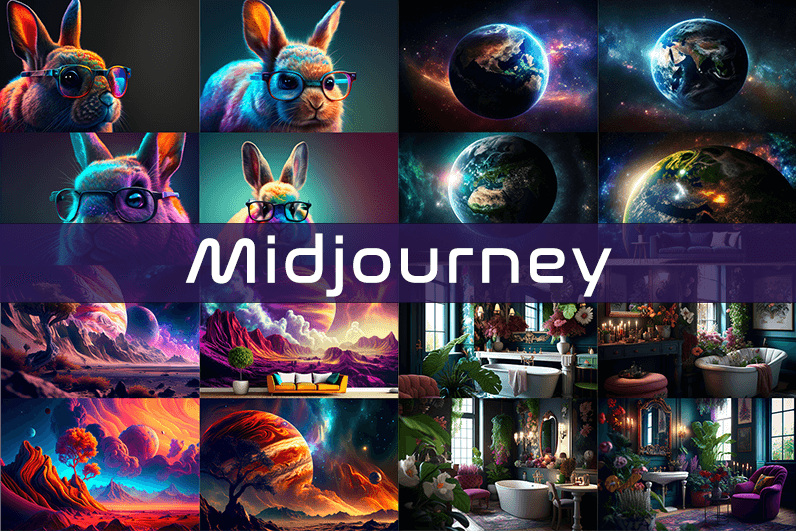
Midjourney is an AI image generation tool based on Discord, utilizing text commands to create images. You can input prompts for the type of image you’re looking for, and the system will generate the image for you. Whether it’s a dragon, an alien spaceship, a dancing puppy, or anything else, the Midjourney bot will assist you.
Key Points
- Discord-Based: Midjourney operates on Discord, so familiarity with Discord chat is necessary.
- High-Quality Images: It generates high-quality images based on text prompts.
- Artistic Styles: Capable of creating images in various artistic styles from sketches to paintings to surreal photos.
- Community Interaction: Engage with the community and participate in channels.
- Image Editing: Allows you to edit your images and create multiple variations.
- Upscaling: You can upscale your images to enlarge them.
- Customization: Fine-tune images by specifying aspect ratio, quality, and chaos levels.
- NLP Features: Excellent natural language processing features ensure accurate results.
- Version 5: The latest version, released in March 2023, is accessible to users.
- No Free Plan: Offers various paid plans according to user needs.
How We Tested the Product
I tested both simple and complex prompts, and Midjourney consistently provided accurate results. While I don’t consider myself an artist, it felt like engaging in artistic creation. You’re only limited by your imagination. It generates four images per prompt. You can select one of the four images and edit it. I tried various styles, and the results were perfect every time. Testing Midjourney felt more like fun than work.
Pros and Cons of Midjourney
Pros 👍
- Extremely easy to use; just type text prompts to generate images.
- Highly accurate results with high-quality images.
- Version 4 was great, and version 5 offers even better results.
- Provides fine-tuning features for artists.
Cons 👎
- No free trial.
- Images are public to other users, so you can’t create business designs.
- Only available on Discord.
- Limited customer support.
What is Midjourney?
Midjourney is a text-to-image generation tool powered by artificial intelligence. It uses Natural Language Processing (NLP) to interpret prompts provided by users and generates relevant images based on those prompts. Currently in version 5.2, Midjourney does not have a standalone application and operates on Discord chat. It boasts a large community where you can join channels to interact with other artists. While it can create stunning images, it is not recommended for business design purposes as all images are public.
How Does Midjourney Work?
Midjourney uses two machine learning techniques: Diffusion Model and Large Language Model. With the Large Language Model, Midjourney understands the meaning of user-entered prompts. Through diffusion, the system adds noise to the training dataset and then reverses the noise to restore the original image, training the AI to generate accurate results based on prompts.
In simpler terms, if you want to create an image of a “ladybug on a blade of grass,” AI starts with noise (like TV static) and gradually diffuses it to create an image matching your prompt, producing a clear image step by step.
Using Midjourney
Midjourney runs on Discord, a text and voice chat application. Here’s how to get started:
- Create a Discord Account: Download the Discord app or open it in your browser.
- Join Midjourney: Accept the invite to join Midjourney, available on their website.
- Enter Midjourney: Join any channel; a newbie channel is a good start. Use the search bar at the top right to find channels.
- Subscribe: You cannot create images without a subscription. Enter
/subscribein the text box to subscribe to their paid plan. - Select a Plan: It will take you to their pricing page. Subscribe to a plan and start creating images.
- Generate Images: Enter
/imagineto open the image prompt. Describe your image, and AI will create it. - Choose and Edit: You will receive four images per prompt. Select one to upscale or edit. Save the image when satisfied.
How to Upscale Images
When you generate an image, you’ll see buttons labeled U1, U2, U3, U4, V1, V2, V3, and V4. The U buttons upscale the selected image, and the V buttons create four new variations of the selected image. Right-click and save the image when you’re happy with the result.
Special Commands in Midjourney
Similar to /imagine, there are other special commands to interact with the Midjourney bot:
/askto ask a question./fastfor faster results./stealthfor stealth mode (your images won’t be visible to others)./subscribeto subscribe to a paid plan.
A full list of commands is available here.
Parameters
There are special parameters you can set with each command:
--aspect: Change the aspect ratio, e.g.,--ar 3:2for a 3:2 aspect ratio.--no: Negative prompts to exclude certain elements, e.g.,--no flowers.--tile: Create seamless images that match each other.
All Midjourney parameters can be found here.
Cost
Midjourney offers four plans:
- Basic Plan: $8/month
- Standard Plan: $24/month
- Pro Plan: $48/month
- Mega Plan: $96/month
These are annual fees, and monthly plans are slightly more expensive. The Basic Plan costs $10/month for a monthly subscription. No free trial is available. The Basic Plan allows for around 200 generations, and all your public images are visible to everyone. Stealth options are available in the Pro and Mega Plans.
Writing Creative Midjourney Prompts
Writing a generic prompt is easy, but crafting a prompt that highlights the beauty of Midjourney’s AI takes experience. Here are some tips:
- Detailed Descriptions: Provide detailed descriptions as AI might misinterpret vague terms.
- Brevity: Keep prompts concise. Longer prompts risk being ignored.
- Negative Prompts: Use negative prompts to exclude elements you don’t want, e.g., “a farm with no animals.”
- Creative Tags: Use creative tags for unusual images, e.g., “a flying dinosaur – creative.”
- Prompt Generator: Use a prompt generator to help create detailed prompts.
Is Midjourney Open Source?
Midjourney is not open source. It’s a self-funded project developed by a small team. Unlike Dall-E by OpenAI, which is open source, Midjourney’s software is not available for use, modification, or distribution. However, the images generated in public channels are “open source” in a sense, as they are publicly accessible.
Is Midjourney Safe?
Personal data provided to Midjourney is stored on their servers in the USA. The company ensures user data is safe and secure and does not sell any of your data. If you have used Midjourney, you can request data deletion by providing your email, Discord user ID, and Midjourney user ID. Publicly generated images on public channels are public and should not be used for business designs like logos.

Здорово, народ Брат не выходит из штопора Жена на грани срыва В клинику везти страшно Короче, единственное что вытащило из запоя — капельница на дому от запоя с препаратами Сняли острую интоксикацию В общем, не потеряйте контакты — капельница от алкоголя на дому цена капельница от алкоголя на дому цена Капельница — это реальный выход Перешлите тем кто в такой же беде
true fortune casino true fortune casino
The casino focuses on ease of use, offering quick access to games and cashier from one account.
Players can choose from hundreds of slot titles covering classic and modern themes.
The welcome offer usually rewards the first deposit with extra bonus funds.
Withdrawal times depend on the chosen method and any verification checks.
The casino is optimised for mobile play on both smartphones and tablets.
References:
Hitnspin casino ähnliche casinos https://www.cams2free.com
Доброго времени А на работу через пару часов Организм просто отказывается работать Короче, врачи приехали и поставили систему — капельница от похмелья купить с выездом Вернулся к жизни В общем, вся инфа по ссылке — прокапать на дому похмелье https://kapelnicza-ot-pokhmelya-ekaterinburg-lks.ru Капельница — это быстро и эффективно Перешлите тем кто в такой же ситуации
20 Super Hot is a five-reel EGT slot built around traditional fruit symbols and simple, fast gameplay.
A star scatter awards wins regardless of where it lands on the screen.
20 super hot slot 20 super hot slot
After a win, players can use the gamble feature to guess the colour of a hidden card.
Flexible stake options make the game accessible to small and large budgets alike.
20 Super Hot is available at many online and social casinos accessible to players in the UK.
يقدم 888starz تصميمًا معرّبًا واضحًا وتنقلًا سلسًا بين الأقسام.
يعمل الكازينو الحي بأكثر من 250 طاولة بموزعين حقيقيين على مدار الساعة.
888starz 888starz
يقدم 888starz تغطية لمباريات القاهرة والدوري المصري إضافة إلى الأحداث الدولية.
يطرح 888starz مكافآت منتظمة تشمل الاسترداد النقدي والترقيات.
يوفر 888starz الدفع عبر Visa و Mastercard و Skrill والكريبتو بحد إيداع منخفض.
1win вывести баланс на мегапей http://1win18094.help
1win notificari app https://www.1win62840.help
лента Х15Ю5 лента Х15Ю5
References:
Hitnspin casino kundenbewertungen https://aquarium-vl.ru/forum/go.php?url=aHR0cDovL2cuaS51YS8/dXNlcklEPTY4OTczNjEmdXNlcklEPTY4OTczNjEmX3VybD1odHRwcyUzQSUyRiUyRmRlLnRydXN0cGlsb3QuY29tJTJGcmV2aWV3JTJGZGVyLXdpa2luZ2VyLXNob3AuZGU
References:
Hitnspin casino alternative https://www.flashback.org/leave.php?u=https://link.zhihu.com/?target=http%3a%2f%2fde.trustpilot.com%2Freview%2Fder-wikinger-shop.de
Здорова, народ Тошнит, трясёт, сил нет Организм просто отказывается работать Короче, нашел реально работающий способ — капельница после похмелья с препаратами Вернулся к жизни В общем, не потеряйте контакты — капельница от запоя воронеж капельница от запоя воронеж Не мучайтесь рассолами Перешлите тем кто в такой же ситуации
References:
Hitnspin casino mit echtgeld http://images.google.gr/url?sa=t&url=http%3A%2F%2Flive.warthunder.com%2Faway%2F%3Fto%3Dhttps%3A%2F%2Fde.trustpilot.com%2Freview%2Fder-wikinger-shop.de
888starz brinda a los jugadores de España acceso a miles de juegos y decenas de deportes desde una misma cuenta.
La sección de casino incluye más de 4000 tragamonedas de los principales proveedores mundiales.
El modo en vivo permite apostar mientras se juega y seguir los resultados al instante.
888starz kirish 888starz kirish
Los jugadores activos disfrutan de cashback semanal y bonos continuos.
El sitio acepta tarjetas y monederos electrónicos además de más de 50 criptomonedas como BTC y USDT.
мостбет краш https://mostbet59898.online/
плинко kaspi gold http://plinko29475.help/
Приветствую Мой брат уже четвёртые сутки в запое Мать на грани Никакие таблетки не помогают Короче, врачи приехали за час — капельница от запоя быстро и эффективно Через пару часов человек пришёл в себя В общем, вся инфа по ссылке — капельницы от алкоголя https://kapelnicza-ot-zapoya-ekaterinburg-sdj.ru Звоните прямо сейчас Перешлите тем кто в такой же беде
mostbet lucky jet bonusu http://mostbet20142.online
Ищешь ключ TF2? tf2 ключи выберите подходящее предложение и оформите покупку за несколько минут. Быстрая доставка, безопасная оплата, удобный интерфейс и актуальная информация о наличии ключей.
1win Мбанк https://www.1win18094.help