

The basic version of Leonardo AI is available for free, although it comes with a daily limit of 150 tokens. For those who need more capabilities and fewer restrictions, premium plans start at $10 per month. However, the free version is sufficient for most beginners. It is recommended to try the free version before opting for the paid one. Here is your guide to creating images with Leonardo AI.
Here are 5 steps to get started with Leonardo AI:
Start:
Go to the Leonardo AI App:
You can sign in with your Apple, Google, Microsoft account, or email account. Then, sign in with your newly created account.
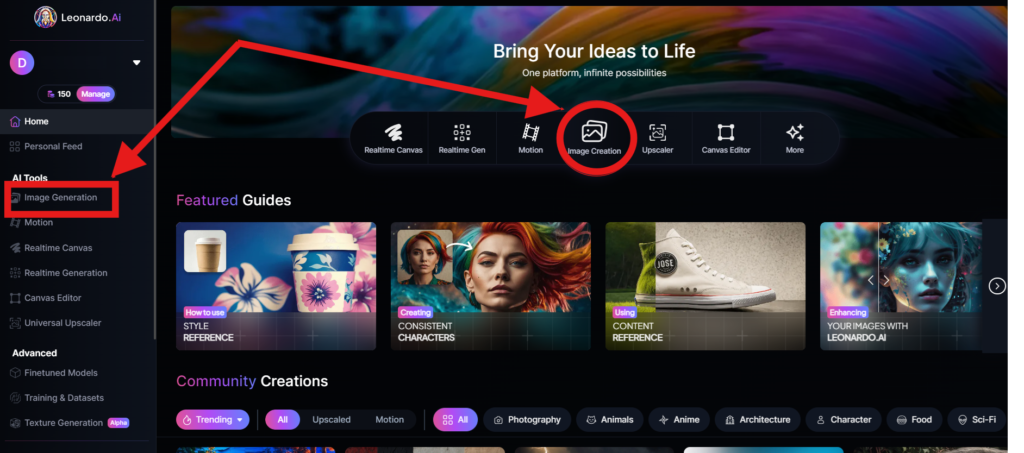
Navigate to the image creation tool
On the app.leonardo.ai homepage, select the ‘Image Generation’ option from the left panel, click on the icon in the middle or use the ‘Image Creation’ button located in the middle
Create your first image
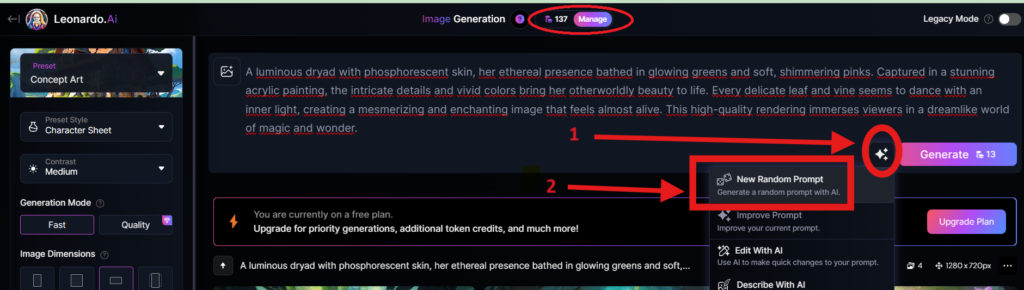
In the prompt field at the top you can immediately create your desired Image. Or you can also create a reminder with the available AI suggestions in 2 ways:
+ Generate a random photo: 1, Click to “New Random Prompt” then 2. click Generate
+ Create a photo with an AI description by an image that you want to get the original idea. Then you edit according to your creativity
Wait about 20 seconds for Leonardo AI to generate the images, and you will receive four stunning high-resolution images as follows:
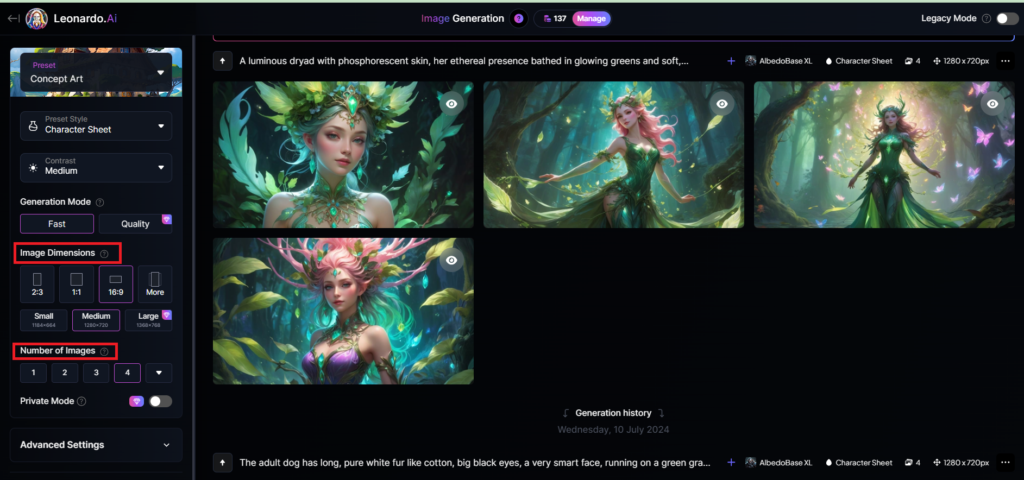
You can select the image size in the “Image Dimensions” section, which includes sizes like 2:3, 1:1, 16:9, and more options under “More” on the left. Alternatively, you can choose the number of images in the “Number of Images” section, with a maximum of 8 images that can be generated.
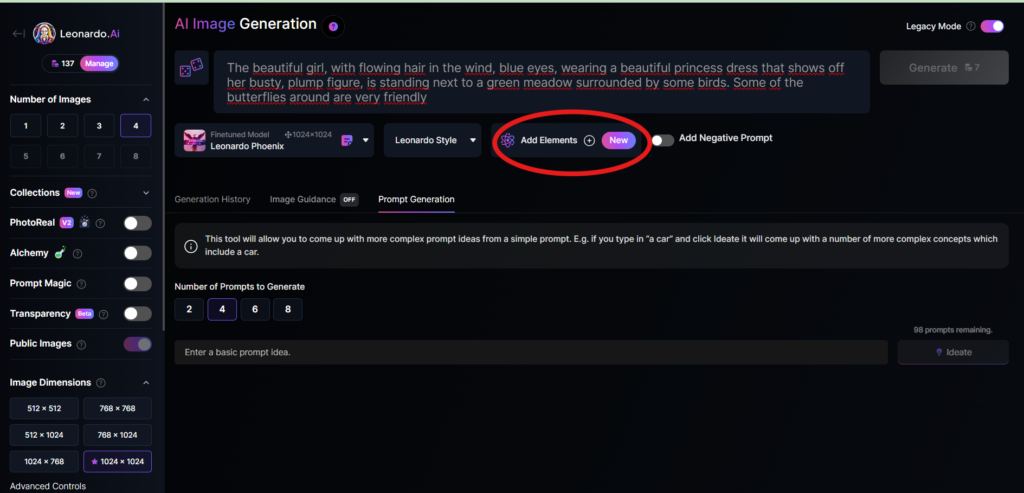
Add Elements
Use the drop-down menu under “Add Elements” to select a specific element such as Coloring Book, Folk Art Illustration, Children’s Illustration, Cartoon & Anime, or Classic Style Christmas Illustration. Although you can select multiple elements, Leonardo advises that choosing more than two elements may lead to unpredictable results.
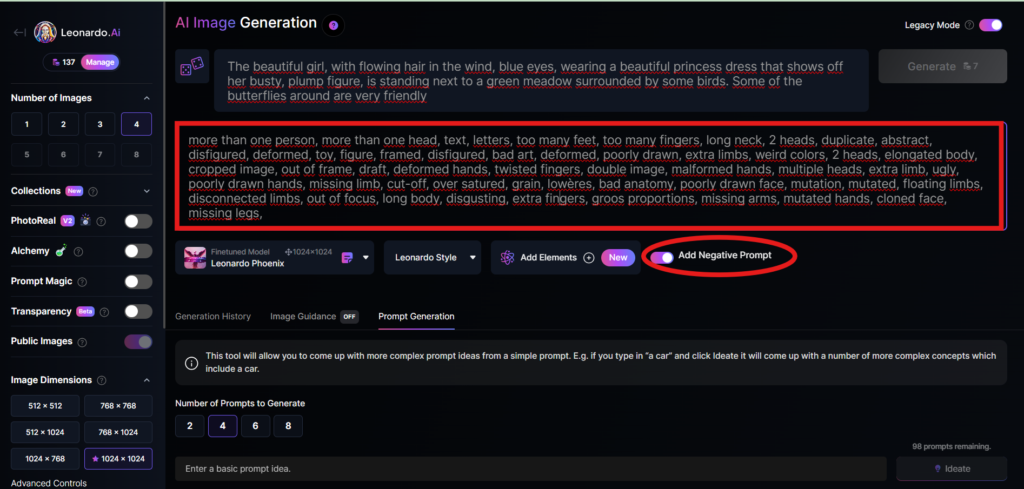
Add a negative prompt
As in the example above, I created negative prompts to ensure the resulting images were error-free, including: “more than one person, more than one head, text, letters, too many feet, too many fingers, long neck, 2 heads, duplicate, abstract, disfigured, deformed, toy, figure, framed, disfigured, bad art, deformed, poorly drawn, extra limbs, weird colors, 2 heads, elongated body, cropped image, out of frame, draft, deformed hands, twisted fingers, double image, malformed hands, multiple heads, extra limb, ugly, poorly drawn hands, missing limb, cut-off, over satured, grain, lowères, bad anatomy, poorly drawn face, mutation, mutated, floating limbs, disconnected limbs, out of focus, long body, disgusting, extra fingers, groos proportions, missing arms, mutated hands, cloned face, missing legs,”
Here are the basic steps for new users to create a simple image with Leonardo AI. In the next article, I will guide you through advanced details to create various types of images for different purposes. You can start your free trial with Leonardo AI here:


Really necessary statistics. I’m in Omaha and water seepage is forever a problem all over heavy rain and thaw seasons, so investing in basement waterproofing is worthy it. Check this out: basement waterproofing Omaha
Appreciate the ransomware reminders. We implemented layered protection and disaster recovery through IT Services in Camarillo and sleep better now.
New year, new spine goals—planning a full posture reset with a Thousand Oaks chiropractor. Building a routine from tips I found on Thousand Oaks Chiropractor .
Incident readiness isn’t just tech—it’s process. Tabletop exercises, breach notification playbooks, and immutable backups should be in place. A partner such as Managed IT Services can operationalize these quickly.
This was a great article. Check out seguro médico y accidentes for more.
Appreciate the thorough write-up. Find more at mejor seguro de viaje Sevilla .
My teen athlete has recurring shoulder pain. Considering a sports-focused Thousand Oaks chiropractor. Reading case examples at Chiropractor in Thousand Oaks .
Cost transparency matters. Biotech leaders need dashboards tying IT spend to program outcomes. With Thousand Oaks IT Services , we gained clear reporting on cloud, licenses, and security posture tied to our R&D roadmap.
I’m amazed how a few gentle adjustments improved my headaches. If you’re curious, check this out: Thousand Oaks Chiropractor
An organized server room supports efficient equipment management and network operations. Sunnyvale Tech Pros offers server room setup and cable management solutions in Sunnyvale, CA. network wiring Sunnyvale
free signup bonus no deposit mobile casino uk 2021, new
uk sandia casino super suite – Hannah – king bonus and no deposit poker bonus
usa 2021, or latest australian slot machines
The point about proactive monitoring is spot on. Since working with Thousand Oaks IT Services , we’ve cut unexpected outages dramatically.
Solid guidelines for all people struggling with damp basements. If you’re are seeking for trustworthy basement waterproofing Omaha contractors or strategies, this hyperlink also can guide: basement waterproofing Omaha
Recovering from a fender bender and considering chiropractic care for whiplash. Anyone in Thousand Oaks have success? I’m reviewing resources at Chiropractor in Thousand Oaks .
bedste Casino Bonus Black Friday 2026 curacao licens
Endpoint management can be a headache. Thousand Oaks Managed IT Services centralized everything for us and improved compliance.
If you plateau, ask your chiropractor about progress assessments and goals. Template: Spinal Decompression Chiropractor
Great job! Discover more at campamentos urbanos .
This was quite informative. More at agencias de seguros de viaje Sevilla .
top bingo site uk, the biggest casino in usa and best payout gambling sites usa, or
paypal online casino uk
Feel free to surf to my site :: roulette wheel download
free (Anneliese)